Website content for SEO works best when it answers a real customer need, not when it simply repeats a target phrase. A service page, product description or helpful guide should make clear who it is for, what the business offers and what a visitor can do next. That gives people a better basis for deciding whether to enquire, while giving search engines useful context about the page. For a small business, the challenge is often knowing what deserves its own page, what details to include and how to sound natural while covering relevant searches. Start by understanding the questions and wording customers use, then organise content around distinct topics rather than forcing every phrase into one page. Use accurate service details, specific evidence, clear headings and links that help visitors move through the site. Local businesses can also explain where they work and any genuine limits to their service area. Good content does not guarantee rankings. Search visibility depends on many factors, and pages should be reviewed as the offer, customer questions and search behaviour change. The practical aim is content that is clear, trustworthy and easy to act on.
Content
Understand search intent
Understand search intent
Before drafting a page, work out what someone is trying to find, understand or do when they enter a particular search. This is search intent. A page can include relevant keywords and still be unhelpful if it answers a different question from the one the visitor has in mind. Start by listing the searches you expect customers to use, then consider the need behind each one rather than treating every phrase as a separate writing task.
A practical first step is to search the phrase yourself and review the results. Note the types of pages that appear, the questions they answer and the details they make easy to find. Results can offer clues about what searchers expect, but they are not a formula to copy. Check that your interpretation also makes sense for your customers and your business. Search results can change, so use them as a prompt for research rather than definitive proof of what every visitor wants.
Many searches have an informational purpose: the person wants an explanation, instructions or an answer to a question. Others suggest the person is comparing options, looking for a particular business or ready to take an action. A search for “how to stop a tap leaking” calls for practical guidance, while “emergency plumber near me” suggests someone may need to find and contact a local service. The wording is useful evidence, but context matters: a broad phrase can have more than one interpretation.
Match the page’s main job to that purpose. An informational page should answer the question clearly and give enough context for the reader to understand their options. A service page should explain what the business offers, who it is for and what a prospective customer can do next. If visitors are comparing choices, address the decision factors they are likely to care about, such as the process, scope or relevant limitations. Avoid making a page serve unrelated purposes simply to fit in more search terms.
Be specific about the visitor’s next step. Someone researching a problem may not be ready to request a quote, so a useful next step might be reading related guidance or learning when to seek professional help. Someone searching for a service may need clear contact details or a straightforward way to enquire. Make the action relevant to the page, and avoid presenting a sales prompt as though it were the answer to an informational question.
Use this intent check when planning or reviewing content: Can a visitor tell quickly that the page addresses their need? Does it answer the central question before getting sidetracked? Is the level of detail appropriate for someone at this stage? Does the next step follow naturally from what they came to do? If the answer to any of these is no, revise the page’s focus before polishing individual phrases. A clear match between the search and the page gives visitors a more useful experience and gives each page a coherent purpose.
Plan pages around topics
A useful website structure helps visitors find the right information without having to work out how your business is organised. Start by listing your main services, products and the questions customers commonly ask before they contact you. Group related topics together, then decide whether each group needs its own page or belongs within a broader page. The aim is not to create a page for every possible search phrase; it is to give each important customer need a clear, relevant place on your site.
Map customer needs to pages
For each topic, write down what a visitor is likely trying to find out. A service page might need to explain what the service includes, who it suits, where it is available and how to ask about it. A supporting page could answer a separate, more specific question. If several topics need the same basic explanation and lead to the same next step, they may be clearer together on one page. If they involve different problems, decisions or processes, separate pages can make the content easier to navigate and more directly useful.
Hypothetical example: A plumber could create separate blocked-drain and hot-water repair pages if each answers different customer questions. The blocked-drain page could explain common signs of a blockage, what information to provide when enquiring and what to expect when arranging an assessment. The hot-water page could cover issues such as inconsistent temperature, the details a customer may need to identify their system, and how to request help. These are different customer situations, so one generic plumbing page may not answer either as clearly. The example does not mean every plumber needs these exact pages; the right structure depends on the services actually offered and the questions customers raise.
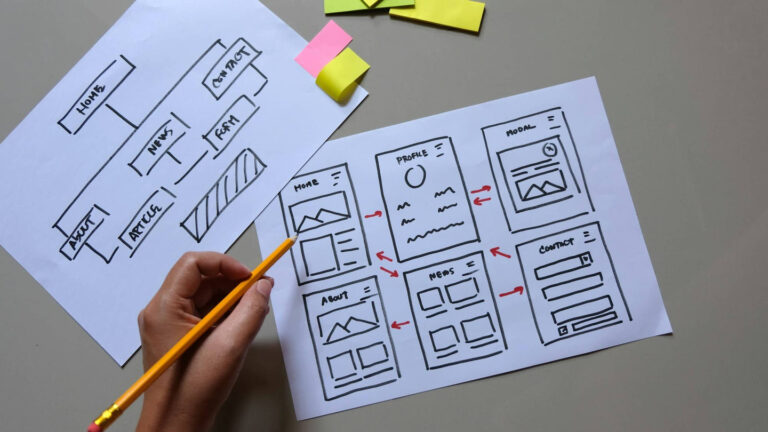
Before writing, sketch a simple page map. Put the homepage at the top, followed by main service or product pages, then any supporting pages that sit beneath them. Use names customers will understand rather than internal team labels or jargon. Check that each proposed page has a distinct purpose and enough accurate information to be useful. If two planned pages would repeat most of the same material, consider combining them and using clear subheadings to cover the related topics. If one page is becoming difficult to scan because it covers several unrelated services, split it into focused pages and explain how they relate.
Give every page a clear connection to the rest of the site. A visitor should be able to move from a broad service overview to a relevant detailed page, and back to an appropriate parent or contact page. Plan these paths while mapping the structure, rather than adding links as an afterthought. Keep navigation manageable: an expanding menu of minor pages can make important choices harder to spot. You can also use frequently asked questions on a service page when they help visitors decide or take the next step; a separate FAQ page is not automatically necessary.
Finally, check your page plan against real business priorities and customer language. Ask whether a new visitor could find the right service, whether the proposed content reflects what the business genuinely provides, and whether each page gives enough information to support an informed enquiry. Record the purpose of each page in a short sentence before drafting it. This simple check helps prevent near-duplicate pages and keeps the structure focused on distinct services and customer questions, rather than creating pages merely to target variations of a search phrase.
Write clear, useful copy
Make the offer and next step clear
A visitor should be able to understand what you offer, who it is for and what to do next without decoding industry jargon. Start with the customer’s need, then describe your service in familiar language. Explain what is included, where relevant, and clarify any terms that could be misunderstood. If you use a specialist term, briefly explain it rather than assuming every reader knows what it means.
For example, instead of opening with a broad claim such as “We deliver integrated property solutions”, a business could say, “We inspect rental properties and arrange repairs for landlords in [service area].” This is a hypothetical example: the wording should reflect the actual services and locations your business covers. Specific, accurate language helps people decide whether they are in the right place and gives search engines clearer context about the page.
Before drafting, list the questions a prospective customer is likely to ask. Think about what they need to know before enquiring: what happens during the service, what information they should prepare, whether there are relevant limitations, and how they can get help. Choose the questions that genuinely apply to the page and answer them directly. A short, useful answer is often better than a long introduction that delays the information people came to find.
Use headings to make those answers easy to scan. A service page might explain what the service involves, who it suits, what the process looks like and what the customer should do next. Keep each section focused on one point, and use short paragraphs when that makes information easier to follow. Avoid repeating the same keyword or claim in every section; repetition can make copy harder to read without adding useful detail.
Be careful with statements about outcomes, timeframes, qualifications or what is included. Check that claims are current and can be substantiated, and state important conditions plainly. If a detail varies between jobs or customers, say so and explain what affects it rather than implying a fixed outcome. Clear boundaries help visitors make informed decisions and reduce the chance that the page creates expectations your business cannot meet.
Make the next step easy to find and describe what will happen after it. Use a clear action such as “Call to discuss your repair” or “Request an inspection”, provided that accurately describes how your business handles enquiries. Place the action where it makes sense after explaining the offer, and repeat it near the end of a longer page if readers may need to scroll. Keep the wording consistent with the actual contact options available on your website.
Check the finished copy from a customer’s point of view. Can someone quickly tell whether the service is relevant, find an answer to a common question and understand how to take the next step? Ask a colleague who is less familiar with the business to read the page and flag vague phrases or missing details. Then revise the copy using real information from your team and customers, not assumptions about what visitors want to hear.
Build trust with real detail
Make every claim easy to verify
Trustworthy website content starts with information customers can rely on. Check that your business name, services, service area, contact details, opening hours and any stated prices or fees are current and consistent across relevant pages. If details vary by location, explain which information applies to each branch or service area. Avoid broad claims such as “available 24/7” or “servicing all of Australia” unless your business can genuinely meet that expectation. An accurate limitation is more useful than a promise that creates the wrong impression.
Review factual details with the people responsible for delivering the service, not just whoever edits the website. Confirm what is included, what may cost extra, whether an assessment is needed before quoting, and what customers should prepare. If a policy or process changes, update the relevant pages rather than relying on a general disclaimer elsewhere. Where information can change frequently, such as opening hours or product availability, make it clear when it was last checked and assign someone to review it.
Use evidence that is relevant and genuine
Support claims with details that help a prospective customer assess whether your business is a suitable choice. Depending on the service, useful evidence might include staff qualifications, licences, professional memberships, years of operation, a clear explanation of your process, or photographs of work your team completed. Name credentials accurately and check any requirements for displaying them. A photo should represent your own work and have permission where needed; do not imply that a stock image shows a real project or customer.
Testimonials and case studies can add context, but use them honestly. Get permission before publishing a customer’s name, image or comments, and do not rewrite a testimonial in a way that changes its meaning. A case study should describe the situation, the work undertaken and any relevant limitations. If you include figures, explain what they refer to and how they were obtained. Do not present an individual outcome as typical or promise that another customer will achieve the same result. When you do not have suitable evidence, provide a clear description of your service rather than manufacturing proof.
Specific, verifiable information can help readers judge your claims and make an informed choice. It can also make a page more useful than generic statements such as “we provide quality service”. This is not a guarantee of higher search rankings: the purpose is to give people accurate information and a sound basis for deciding what to do next.
Add local context only where it is true
For a business serving particular communities, explain the real connection. State the suburbs, towns or regions you serve if you can confirm them, and describe relevant practical details, such as travel arrangements or how service availability differs between areas. Mention local conditions only when they affect the work and you can explain why. Avoid adding suburb names to a page without useful information for people there, or suggesting you have a local office when you do not. A transparent service-area page is more helpful than a list of locations added solely to attract searches.
Before publishing, read the page as a cautious customer would: can they tell who provides the service, what is included, where it is available and how to verify important claims? Ask the relevant staff member to check those details, then set a review date for information likely to change. This simple process keeps content credible and helps customers make decisions with fewer surprises.
Review content and SEO basics
Make every page easier to scan and navigate
A useful page should help visitors find the information they need without making them work through a wall of text. Organise the content with a clear heading structure: use one main page heading, then descriptive subheadings for the sections that follow. Headings should tell readers what each section covers, rather than relying on vague labels such as “More information” or “Our approach”. This makes the page easier to scan and can also help people using assistive technology understand how its content is organised.
Write headings for people first. Include a relevant service or topic where it fits naturally, but avoid repeating the same search phrase in every heading. A heading should accurately describe the section beneath it; it should not promise information the page does not provide. Keep paragraphs focused, and use lists when they make steps, requirements or options easier to follow. Check that text is readable on a phone, with enough contrast and spacing to distinguish headings and links from surrounding content.
Internal links connect one page on your website to another. Use them when a reader is likely to need a related detail, such as linking a service page to relevant pricing information, service areas or a page explaining how the process works. Choose link text that describes the destination. For example, “read our guide to preparing for a roof inspection” is more informative than “click here”. Clear link text helps visitors understand what will happen when they follow a link, including people who navigate using a screen reader or move through links with a keyboard.
Add links where they genuinely help, not simply to increase the number of links on a page. Check that each link opens the intended page and that the destination is still relevant. Avoid linking every mention of a topic, and do not make colour the only way a link is distinguished from ordinary text. If your site uses a visual style that makes links hard to recognise, ask your web professional to review it for accessibility.
Set a practical content review routine
Website content can become inaccurate as your services, service areas, opening hours, staff, processes or contact details change. Keep a simple record of important pages and when they were last checked. Review high-priority pages more often, especially pages customers rely on to make decisions or contact your business. A review does not need to mean rewriting everything: confirm the facts, remove outdated details, check links and make sure the page still answers the questions customers are likely to have.
When reviewing a page, read it as a first-time visitor. Is the purpose clear near the beginning? Are the next steps and contact options easy to find? Do headings describe the information that follows? Are links still useful, and does the page work on a mobile screen? Also check for old dates, discontinued services, changed policies and claims that are no longer supported by current evidence. If a detail is uncertain, verify it with the person responsible before publishing a change.
Treat search optimisation as part of maintaining a useful website, not as a reason to add repetitive keywords or unnecessary copy. Accurate information, clear organisation and helpful navigation support visitors and make the subject of a page easier to understand. Keep a record of changes so you can revisit decisions later, and prioritise corrections that could mislead customers or prevent them from completing an important task.
Conclusion: Make usefulness the standard
Useful website content is not simply a collection of keywords or pages designed to attract clicks. It should help a potential customer understand whether your business can meet their needs, what to expect and how to take the next step. Make that standard when planning new pages and reviewing existing ones.
Start with the questions customers ask before they contact you or make a purchase. Check that each page answers its main question directly, uses plain language and gives accurate details about your services, location and process. Make important information easy to find, and link to a relevant page when it helps someone understand another part of the decision.
Review pages when a service changes, customers raise recurring questions or you notice information is unclear or out of date. You can also check whether headings describe the content and whether the next action is obvious on mobile and desktop. Prioritise updates that reduce confusion or help customers choose confidently; improving content is an ongoing part of maintaining a useful website.
Explore related information: Booking Website Design & Development; Web Design Sunshine Coast.